Reset a forgotten password or username
Go to my.oogle.net/client/login/reset/, enter your email address and select Reset Password. Open the email we send, choose a new password and select Set Password. Forgot which email you used? Use Forgot My Username.
Applies to: Oogle client portal
On this page
If you've forgotten your password, request a reset link at https://my.oogle.net/client/login/reset/ and choose a new one. If you're not sure which email address your account uses, recover your username first at https://my.oogle.net/client/login/forgot/.
Reset your password
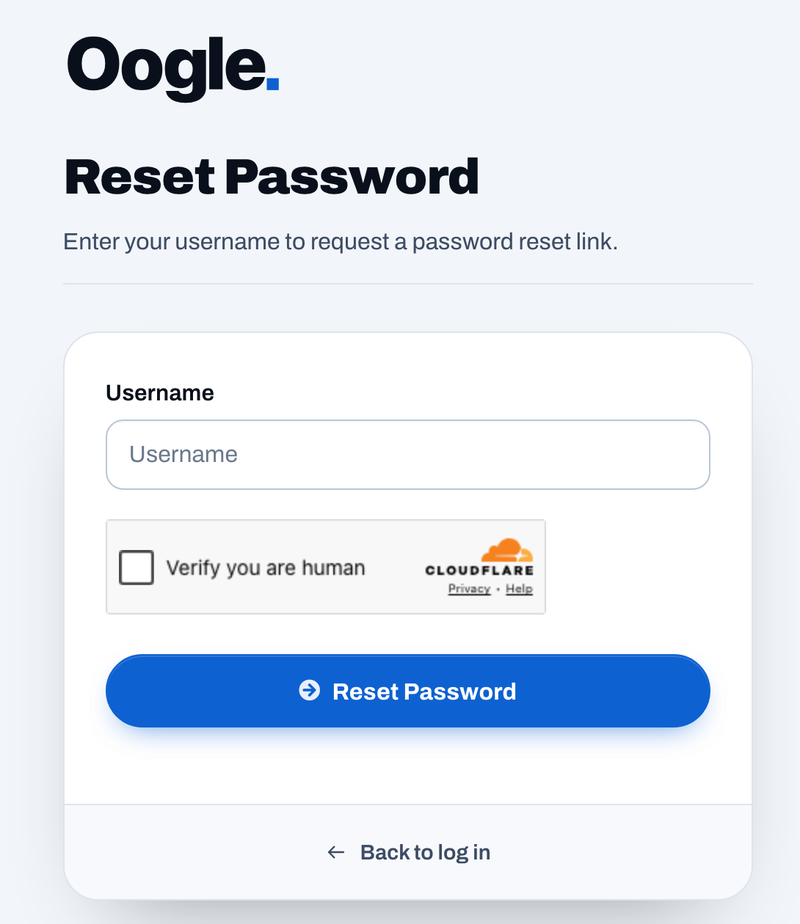
- Go to https://my.oogle.net/client/login/reset/, or select Reset My Password on the Log In page. You'll see the heading Reset Password and the text "Enter your username to request a password reset link."
- In Username, enter the email address your account was set up with.
- Select Reset Password.
- Open the email with the subject "Reset your Oogle portal password". It comes from an address ending in @my.oogle.net.
- Select the link in the email. It opens Confirm Password Reset.
- Type your new password in New Password, then type it again in Confirm New Password.
- Select Set Password.
- Sign in at https://my.oogle.net/client/login/ with your email address and your new password.
Use the newest email
If you requested more than one reset, use the link in the most recent email.
Recover your username
Your username is the email address on your account. If you have more than one address and aren't sure which one we have:
- Go to https://my.oogle.net/client/login/forgot/, or select Forgot My Username on the Log In page.
- In Email Address, enter an address you think you used.
- Select Recover Username.
- Check that inbox. Only the address on your account gets an email. If nothing arrives, try your other addresses.
You'll know it worked when
You can sign in with your email address and new password and land on your Dashboard, with the welcome banner and the buttons Open a ticket, View invoices and View services.
If it doesn't work
- No reset email arrives. Check your spam or junk folder and search for "my.oogle.net". Make sure you entered the address that's on your account, not another one. Try Forgot My Username to find out which it is.
- The link in the email doesn't work. It may have been used already, or you may have requested a newer one. Request a fresh reset and use the newest email.
- The passwords don't match. Retype both fields. Passwords are case-sensitive, so check Caps Lock.
- You no longer have access to the email address on your account. You can't reset it yourself. Call 833-336-6453 or email [email protected]. We'll check it's you before changing anything.
- Your password works but your two-step code doesn't. That's a different problem: see Turn on two-factor authentication for what to do about codes and a lost phone.
- You didn't ask for a reset email. Don't select the link. Your password hasn't changed. If you keep getting them, set a new password using the steps above and read Keep your Oogle account secure.
Never share your password
Oogle will never ask for your portal password, by email, phone or in a ticket. A message that does isn't from us: see How to recognize an official Oogle message.
Next steps
- Turn on two-factor authentication so a password alone isn't enough to get in.
- Sign in to the client portal.
Frequently asked questions
What's my username?
The email address your account was set up with. The field says Username, but your email address goes in it.
Can Oogle reset my password for me?
We won't set or send you a password. Use Reset My Password so only you know it. If you no longer have access to the email address on your account, contact us and we'll verify it's you before changing it.
Does resetting my password turn off two-factor authentication?
No. If two-factor authentication is on, you'll still need a code from your authenticator app after your password.